
Documentation Index
Fetch the complete documentation index at: https://docs.cadcamfun.xyz/llms.txt
Use this file to discover all available pages before exploring further.
AI Features
The CAD/CAM application integrates advanced artificial intelligence features that revolutionize the way you design and produce. This section explores in detail how AI can assist and enhance your workflow from initial conception to final production.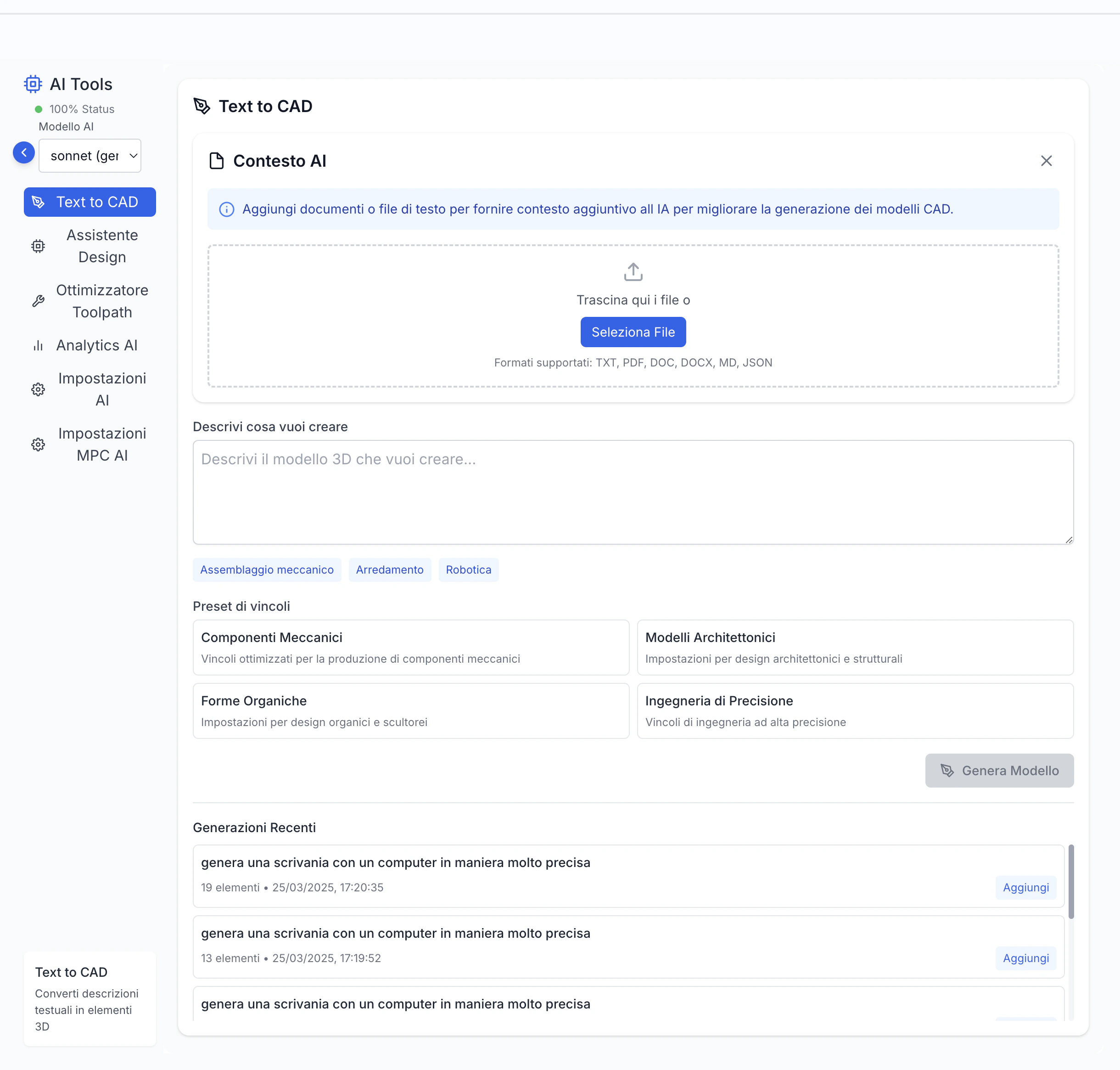
AI Features Overview
Artificial intelligence is integrated into various aspects of the application, offering assistance in different process stages:Main AI Components
AI Design Assistant
AI Toolpath Optimizer
AI Material Advisor
AI Parameter Optimizer
AI Problem Solver
AI Integration Benefits
Workflow Acceleration
Workflow Acceleration
- Reduced Design Time: Automate repetitive tasks
- Faster Programming: Quick generation of toolpaths
- Streamlined Process: Optimized workflow steps
- Efficient Iterations: Rapid design modifications
Creative Block Overcoming
Creative Block Overcoming
- Innovation Support: Generate creative solutions
- Design Inspiration: Explore alternative approaches
- Pattern Recognition: Identify optimal solutions
- Iterative Improvement: Refine designs progressively
Automatic Optimization
Automatic Optimization
- Performance Enhancement: Improve efficiency
- Quality Improvement: Optimize output quality
- Resource Optimization: Better resource utilization
- Process Streamlining: Automate optimization steps
Skill Democratization
Skill Democratization
- Accessible Expertise: Make advanced techniques available
- Learning Support: Guide users through complex processes
- Standardization: Ensure consistent quality
- Knowledge Transfer: Share best practices
Continuous Learning
Continuous Learning
- Adaptive Improvement: System learns from usage
- Feedback Integration: Incorporate user feedback
- Performance Evolution: Enhance capabilities over time
- Pattern Recognition: Identify improvement areas
Underlying AI Technologies
Machine Learning
Machine Learning
- Data Learning: Algorithms learn from past data
- Pattern Recognition: Identify recurring patterns
- Predictive Analysis: Forecast outcomes
- Adaptive Behavior: Adjust to new information
Deep Learning
Deep Learning
- Neural Networks: Process complex patterns
- Feature Extraction: Identify key characteristics
- Hierarchical Learning: Understand layered relationships
- Complex Recognition: Handle sophisticated patterns
Natural Language Processing
Natural Language Processing
- Text Understanding: Process written descriptions
- Context Analysis: Understand context and intent
- Language Generation: Create natural responses
- Command Processing: Interpret user instructions
Computer Vision
Computer Vision
- Image Analysis: Process visual information
- 3D Recognition: Understand spatial relationships
- Pattern Detection: Identify visual patterns
- Quality Assessment: Evaluate visual quality
Optimization Algorithms
Optimization Algorithms
- Parameter Optimization: Find optimal values
- Multi-objective Balancing: Balance multiple criteria
- Constraint Handling: Manage system limitations
- Performance Tuning: Optimize system behavior
AI Design Assistant
Main Features
Text Generation
Context Understanding
Parametric Generation
Constraint Respect
Multiple Variants
Using the AI Design Assistant
Effective Prompt Tips
Be Specific
Be Specific
Provide Context
Provide Context
Mention Dimensions
Mention Dimensions
Include Material
Include Material
Describe Function
Describe Function
Modification and Refinement
Parametric Modification
Parametric Modification
- Adjust key parameters to adapt the model
- Modify dimensions and relationships
- Update constraints and requirements
- Fine-tune specific features
Direct Editing
Direct Editing
- Use standard CAD tools for refinement
- Modify geometry directly
- Add or remove features
- Adjust surface properties
Iteration
Iteration
- Generate new versions with modified prompts
- Compare different iterations
- Combine best features
- Refine progressively
Combination
Combination
- Merge multiple generations
- Create complex assemblies
- Combine with existing models
- Build complete systems
Annotation
Annotation
- Add technical information
- Include metadata
- Document modifications
- Track changes
AI Toolpath Optimizer
Main Features
Cycle Time Reduction
Surface Quality
Tool Life Extension
Multi-objective Balance
Smart Adaptation
Usage Mode
Optimization Parameters
Speed Priority
Speed Priority
- Focus on cycle time reduction
- Optimize feed rates
- Minimize air cutting
- Balance with quality
Quality Priority
Quality Priority
- Focus on surface finish
- Optimize cutting conditions
- Maintain consistent quality
- Balance with efficiency
Balanced Approach
Balanced Approach
- Balance speed and quality
- Consider multiple factors
- Optimize overall performance
- Adapt to requirements
Conservative Mode
Conservative Mode
- Maximum safety focus
- Reliable operation
- Stable cutting conditions
- Risk minimization
Custom Configuration
Custom Configuration
- Manual priority setting
- Custom optimization rules
- Specific requirements
- Flexible adaptation
Comparative Analysis
Side-by-Side View
Side-by-Side View
- Simultaneous visualization
- Easy comparison
- Visual differences
- Interactive switching
Comparative Statistics
Comparative Statistics
- Key metrics comparison
- Performance indicators
- Quality metrics
- Efficiency measures
Predictive Simulation
Predictive Simulation
- Result prediction
- Strategy comparison
- Performance forecast
- Risk assessment
Differential Analysis
Differential Analysis
- Version differences
- Change highlighting
- Impact assessment
- Improvement tracking
Virtual Testing
Virtual Testing
- Behavior simulation
- Real condition testing
- Performance validation
- Quality verification
AI Material Advisor
Main Features
Contextual Suggestions
Requirement Analysis
Material Comparison
Behavior Simulation
Production Considerations
Using the Material Advisor
Selection Criteria
Mechanical Requirements
Mechanical Requirements
- Strength properties
- Stiffness characteristics
- Hardness specifications
- Fatigue resistance
Physical Properties
Physical Properties
- Density characteristics
- Thermal conductivity
- Electrical properties
- Corrosion resistance
Environmental Factors
Environmental Factors
- Corrosion resistance
- Temperature range
- Chemical resistance
- Weather resistance
Economic Considerations
Economic Considerations
- Material cost
- Processing cost
- Availability
- Lifecycle cost
Sustainability
Sustainability
- Environmental impact
- Recyclability
- Energy efficiency
- Carbon footprint
Material Database
Standard Materials
Standard Materials
- Common material types
- Industry standards
- Typical applications
- Basic properties
Specialized Materials
Specialized Materials
- Advanced alloys
- Composite materials
- Special coatings
- Custom formulations
Verified Properties
Verified Properties
- Industry standards
- Test data
- Quality certifications
- Performance records
Regular Updates
Regular Updates
- Database maintenance
- New materials
- Updated properties
- Version control
Custom Integration
Custom Integration
- Proprietary materials
- Custom databases
- Special properties
- Company standards
AI Parameter Optimizer
Main Features
Smart Parameter Selection
Real-time Adaptation
Performance Optimization
Tool Life Management
Quality Assurance
Using the Parameter Optimizer
Optimization Criteria
Cutting Speed
Cutting Speed
- Optimal cutting speed calculation
- Material-specific recommendations
- Tool life considerations
- Surface finish impact
Feed Rate
Feed Rate
- Feed rate optimization
- Chip load management
- Tool deflection control
- Surface quality balance
Depth of Cut
Depth of Cut
- Optimal depth calculation
- Tool strength consideration
- Machine capability limits
- Process stability
Step Over
Step Over
- Step over optimization
- Surface finish control
- Material removal rate
- Tool engagement
Coolant Usage
Coolant Usage
- Coolant flow optimization
- Temperature control
- Tool life enhancement
- Surface finish impact
Parameter Validation
Simulation Testing
Simulation Testing
- Virtual machining simulation
- Parameter validation
- Performance prediction
- Risk assessment
Quality Verification
Quality Verification
- Surface finish analysis
- Dimensional accuracy
- Tool wear prediction
- Process stability
Machine Compatibility
Machine Compatibility
- Machine capability check
- Power requirements
- Speed range verification
- Feed rate limits
Safety Assessment
Safety Assessment
- Safety parameter validation
- Risk factor analysis
- Emergency stop capability
- Operator safety
Cost Analysis
Cost Analysis
- Production cost optimization
- Tool life impact
- Cycle time analysis
- Resource utilization
AI Problem Solver
Main Features
Issue Detection
Solution Generation
Preventive Analysis
Learning System
Knowledge Base
Using the Problem Solver
Analysis Types
Design Validation
Design Validation
- Geometric validation
- Feature compatibility
- Manufacturing feasibility
- Assembly verification
Toolpath Analysis
Toolpath Analysis
- Collision detection
- Tool engagement analysis
- Machine capability check
- Process stability
Quality Control
Quality Control
- Surface finish prediction
- Dimensional accuracy
- Tolerance verification
- Quality standards
Performance Optimization
Performance Optimization
- Cycle time analysis
- Resource utilization
- Efficiency improvement
- Cost optimization
Safety Assessment
Safety Assessment
- Safety compliance
- Risk assessment
- Emergency procedures
- Operator safety
Solution Management
Solution Database
Solution Database
- Common solutions
- Best practices
- Industry standards
- Expert knowledge
Custom Solutions
Custom Solutions
- Company-specific fixes
- Custom procedures
- Special requirements
- Unique processes
Solution Validation
Solution Validation
- Effectiveness verification
- Implementation testing
- Result confirmation
- Performance tracking
Knowledge Sharing
Knowledge Sharing
- Team collaboration
- Experience sharing
- Best practice updates
- Solution improvement
Continuous Learning
Continuous Learning
- Solution refinement
- Pattern recognition
- Performance improvement
- System updates
The AI features of the CAD/CAM application offer a powerful assistant that amplifies your creative and technical capabilities. Used with awareness, these technologies can dramatically improve productivity, quality, and innovation. In the next section, we’ll explore the collaboration and sharing features, essential for team work.
AI Integration in Workflow
Enhanced Workflow
Design Phase
Engineering Phase
CAM Phase
Production Phase
AI Environment Configuration
Assistance Level
Assistance Level
- Discreet suggestions
- Active collaboration
- Custom preferences
- Adaptive behavior
Priority Focus
Priority Focus
- Speed optimization
- Quality focus
- Cost reduction
- Resource efficiency
Work Style
Work Style
- Interactive mode
- Batch processing
- Automated workflow
- Hybrid approach
Domain Knowledge
Domain Knowledge
- Industry specialization
- Process optimization
- Material expertise
- Tool knowledge
Interface Preferences
Interface Preferences
- Visual feedback
- Command line
- Mixed interface
- Custom layout
Learning and Adaptation
Feedback Learning
Feedback Learning
- User interaction analysis
- Performance improvement
- Pattern recognition
- Behavior adaptation
User Personalization
User Personalization
- Preference learning
- Style adaptation
- Workflow optimization
- Custom settings
Organizational Learning
Organizational Learning
- Company knowledge
- Process optimization
- Best practices
- Standard procedures
Domain Specialization
Domain Specialization
- Industry expertise
- Technical knowledge
- Process understanding
- Quality standards
Model Updates
Model Updates
- Regular updates
- Feature additions
- Performance improvements
- Bug fixes
Privacy and Data Management
Privacy Policies
Data Control
Local Processing
Encryption
Anonymization
Compliance
Data Usage for Learning
Opt-in Learning
Opt-in Learning
- Explicit consent
- Data selection
- Usage control
- Transparency
Aggregated Data
Aggregated Data
- Statistical analysis
- Anonymous usage
- Pattern recognition
- Performance metrics
Transparency
Transparency
- Clear information
- Usage details
- Data handling
- Privacy controls
Tangible Benefits
Tangible Benefits
- Feature improvements
- Performance gains
- Quality enhancements
- User experience
Granular Control
Granular Control
- Detailed settings
- Preference management
- Data sharing
- Privacy options
Integrated Security
IP Protection
IP Protection
- Project security
- Access control
- Version tracking
- Audit logging
Data Isolation
Data Isolation
- Client separation
- Project isolation
- Access management
- Security boundaries
Security Audits
Security Audits
- Regular reviews
- Vulnerability assessment
- Compliance checks
- Security updates
Proactive Updates
Proactive Updates
- Security patches
- Feature updates
- Performance improvements
- Bug fixes
Access Management
Access Management
- Role-based access
- Permission control
- User management
- Activity monitoring
Current Limitations and Future Developments
AI Feature Limitations
Complexity Limits
Specialist Knowledge
Ambiguity Handling
Creative Guidance
Data Dependencies
Development Roadmap
Capability Expansion
Capability Expansion
- Complex geometry support
- Advanced structures
- New features
- Enhanced capabilities
IoT Integration
IoT Integration
- Machine connectivity
- Sensor data
- Real-time monitoring
- Process optimization
Multi-agent Collaboration
Multi-agent Collaboration
- Specialized AI systems
- Coordinated actions
- Task distribution
- Result integration
Causal Reasoning
Causal Reasoning
- Cause-effect analysis
- Problem solving
- Decision making
- Impact assessment
Multimodal Interaction
Multimodal Interaction
- Voice input
- Gesture control
- Visual recognition
- Natural interaction
Contributing to Improvement
Structured Feedback
Structured Feedback
- Specific evaluations
- Performance feedback
- Feature requests
- Bug reports
Problem Reporting
Problem Reporting
- Issue documentation
- Error tracking
- Performance issues
- User experience
Feature Suggestions
Feature Suggestions
- New capabilities
- Improvements
- Workflow enhancements
- User interface
Beta Testing
Beta Testing
- Early access
- Feature testing
- Feedback collection
- Performance monitoring
Use Case Sharing
Use Case Sharing
- Implementation examples
- Success stories
- Best practices
- Industry applications
Tips and Best Practices
Maximizing Results
Context Provision
Progressive Iteration
Constructive Feedback
Hybrid Approach
Result Verification
Effective Prompt Strategies
Clarity and Precision
Clarity and Precision
- Clear instructions
- Specific requirements
- Unambiguous language
- Detailed context
Technical Language
Technical Language
- Industry terminology
- Technical specifications
- Standard terms
- Professional vocabulary
Explicit Priorities
Explicit Priorities
- Clear objectives
- Priority levels
- Critical factors
- Success criteria
Constraints and Requirements
Constraints and Requirements
- Technical limits
- Process requirements
- Quality standards
- Safety considerations
Examples and References
Examples and References
- Visual examples
- Reference models
- Similar cases
- Best practices
Training Integration
Understanding Reasoning
Understanding Reasoning
- Logic analysis
- Decision process
- Solution approach
- Learning outcomes
Alternative Exploration
Alternative Exploration
- Different approaches
- Solution comparison
- Method evaluation
- Best practice learning
Virtual Mentoring
Virtual Mentoring
- Technique learning
- Skill development
- Knowledge transfer
- Experience sharing
Scenario Simulation
Scenario Simulation
- Virtual testing
- Situation analysis
- Performance evaluation
- Risk assessment
Personalized Learning
Personalized Learning
- Focused training
- Skill gaps
- Progress tracking
- Achievement goals
Responsible Adoption
Critical Verification
Critical Verification
- Result validation
- Quality control
- Performance check
- Safety verification
Human Responsibility
Human Responsibility
- Decision control
- Quality assurance
- Safety management
- Process oversight
Transparency
Transparency
- Clear communication
- Process visibility
- Result tracking
- Performance monitoring
Constructive Feedback
Constructive Feedback
- Improvement suggestions
- Issue reporting
- Feature requests
- User experience
Continuous Updates
Continuous Updates
- Feature awareness
- Capability tracking
- Performance monitoring
- Best practice updates
The AI features of the CAD/CAM application offer a powerful assistant that amplifies your creative and technical capabilities. Used with awareness, these technologies can dramatically improve productivity, quality, and innovation. In the next section, we’ll explore the collaboration and sharing features, essential for team work.