
Documentation Index
Fetch the complete documentation index at: https://docs.cadcamfun.xyz/llms.txt
Use this file to discover all available pages before exploring further.
Materials and Tools Management
Effective management of materials and tools is fundamental for CAM programming and achieving optimal results in CNC machining. This section explores all available features for managing your library of materials and tools within the application.
Overview
Unified Library
Unified Library
The unified library is your central access point for materials and tools:
- Integrated access: Available from both CAD and CAM editors
- Consistent interface: Uniform user experience for all resources
- Universal search: Quickly find any material or tool
- Centralized management: Manage all resources from a single interface
Organization
Organization
Hierarchical organization system:
- Categories and subcategories: Organize resources in a hierarchical structure
- Tags and metadata: Add descriptive information for easy search
- Dynamic filters: Quickly filter based on various criteria
- Custom views: Configure display based on your preferences
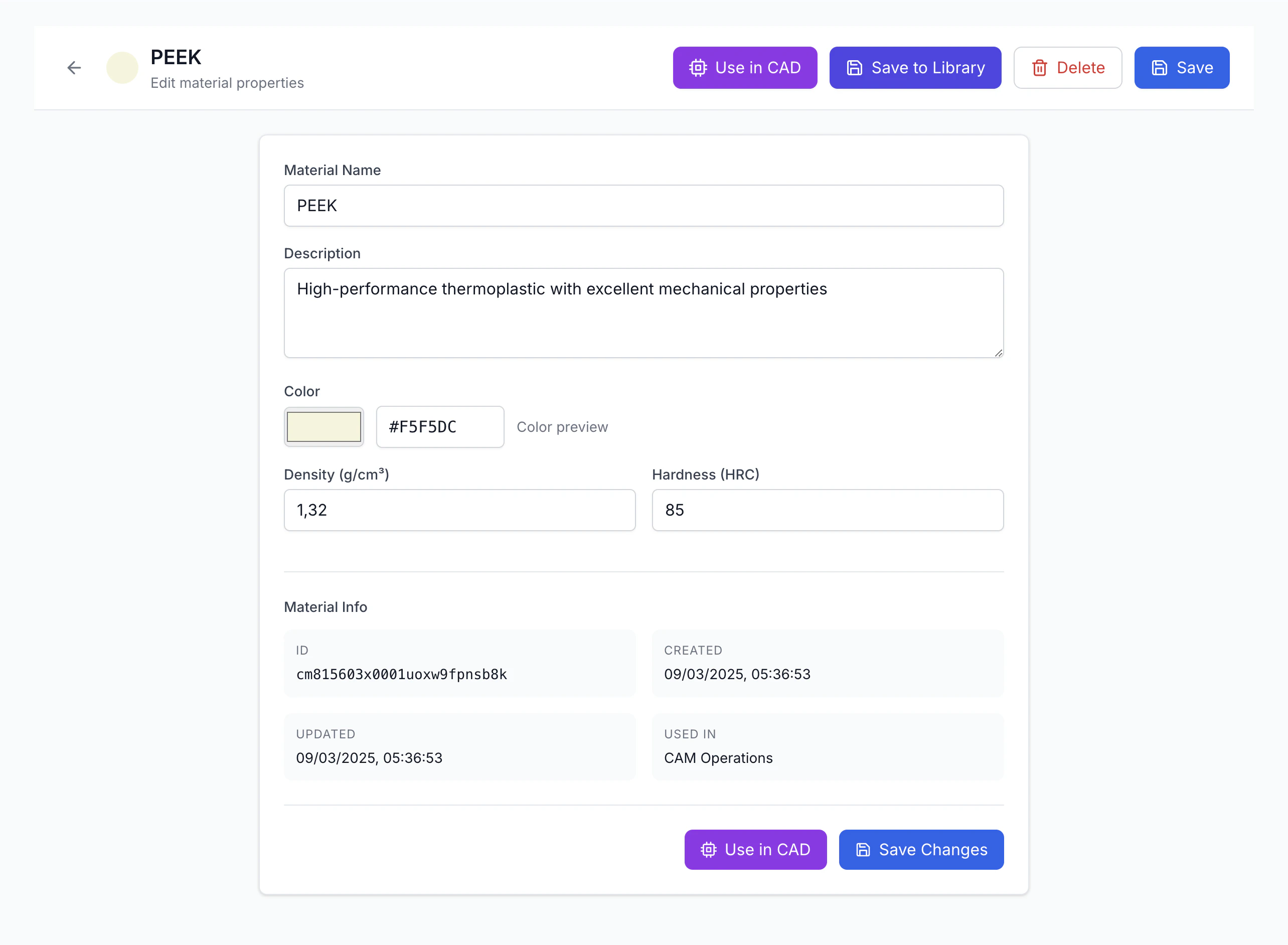
Materials Management
Material Catalog
- Standard materials library
- Custom material creation
- Import from suppliers
- Category organization
Material Properties
- Physical properties
- Mechanical properties
- Machining parameters
- Commercial information
Creating New Materials
Material Management
Material Catalog
Material Catalog
The material catalog contains a vast collection of predefined and custom materials:
- Standard materials: Library of common materials with preconfigured properties
- Custom materials: Create and configure specific materials
- Import: Import material databases from suppliers or other sources
- Organization: Categorize materials by type, application, supplier, etc.
Material Properties
Material Properties
Each material includes a complete set of properties:
- Physical properties: Density, thermal conductivity, elastic modulus, etc.
- Mechanical properties: Tensile strength, hardness, resilience, etc.
- Machinability properties: Recommended parameters for different machining processes
- Commercial information: Product codes, suppliers, costs, etc.
- Standards and certifications: Information on compliance with specific standards
Advanced Management
Advanced Management
Advanced features for material management:
- Versioning: Track changes with version control
- Cloning: Create new materials based on existing ones
- Comparison: Compare properties of different materials
- Export/Import: Exchange material definitions with other systems
- Testing and validation: Record test results to verify properties
Using Materials in the Workflow
CAD Integration
- Component material assignment
- Visual properties display
- Mass analysis
- Bill of materials generation
CAM Integration
- Automatic cutting parameters
- Machining strategies
- Tool life estimation
- Material behavior simulation
Parameter Optimization
Parameter Optimization
- Parameter database: Access databases of parameters optimized for material/tool combinations
- Learning: System improves recommended parameters based on feedback
- Parameter testing: Run tests to optimize parameters for specific materials
- Notes and tips: Display specific suggestions for machining the selected material
Tool Management
Tool Catalog
Tool Catalog
The tool catalog offers a wide range of tools for various operations:
- Standard library: Common tools with predefined geometries and properties
- Custom tools: Create and configure specific tools
- Manufacturer tools: Import catalogs from major manufacturers
- Organization: Categorize by type, size, application, etc.
Supported Tool Types
Supported Tool Types
The application supports various tool types:
- Milling tools: End mills, ball mills, toroidal, tapered, etc.
- Drilling tools: Twist drills, gun drills, center drills, reamers, etc.
- Turning tools: Roughing, finishing, profiling, threading tools, etc.
- Special tools: Engravers, knurling tools, thread mills, etc.
- Modular systems: Tool configurations with toolholders and extensions
Tool Properties
Tool Properties
Each tool includes a complete set of properties:
- Geometry: Dimensions, shape, angles, tolerances
- Tool material: HSS, carbide, ceramic, PCD, etc.
- Coating: Coating type and its properties
- Recommended cutting parameters: For different materials and operations
- Manufacturer information: Product code, technical specifications, cost
Creating New Tools
Using Tools in the CAM Workflow
Tool Selection
- Guided selection based on operation
- Smart filtering
- Automatic parameter generation
- Alternative tool comparison
Inventory Management
- Tool inventory tracking
- Machine positioning
- Availability planning
- Automatic ordering
Tool Path Optimization
Tool Path Optimization
- Tool load analysis: Simulate and optimize load on the tool
- Wear management: Adapt parameters based on expected wear
- Entry/exit strategies: Optimize approaches and retracts
- Multi-tool optimization: Balance workload between tools
Simulation and Verification
Simulation and Verification
- Realistic simulation: View exact tool behavior
- Collision checking: Check potential collisions
- Material removal analysis: Verify efficiency
- Tool life prediction: Estimate based on operations
Cutting Parameters and Technology Database
Parameter Database
Parameter Database
The application includes comprehensive databases of optimized cutting parameters:
- Material-tool pairs: Parameters specific to material and tool combinations
- Operation-specific: Parameters optimized for different operation types
- Condition-specific: Variations for different conditions
- Manufacturer data: Parameters recommended by tool manufacturers
Parameter Management
Parameter Management
- Customization: Modify parameters based on experience
- History: Track changes and results
- Import/Export: Exchange with other systems
- Updates: Sync with manufacturer databases
Automatic Calculation
Automatic Calculation
- Parameter suggestion: Generate optimal parameters
- Real-time adaptation: Modify based on conditions
- AI optimization: Use AI algorithms
- Feedback loop: Integrate machining feedback
Integration with Inventory Management System
Inventory Tracking
- Real-time availability
- Location tracking
- Barcode/RFID support
- Usage monitoring
Resource Planning
- Needs forecasting
- Stock notifications
- Order planning
- Inventory optimization
Purchase Processes
Purchase Processes
- Purchase requests: Generate PRs directly
- Supplier catalog: Maintain supplier database
- Price comparison: Compare supplier costs
- Order tracking: Monitor order status
External Integration
External Integration
- ERP: Connect with company systems
- MES: Manufacturing execution systems
- Supplier systems: Direct portal connections
- Tool management: Specific system integration
Analysis and Optimization
Usage Analysis
- Usage statistics
- Cost analysis
- Efficiency evaluation
- Performance comparison
Data-Based Optimization
- Smart suggestions
- Wear prediction
- Predictive analysis
- Industry benchmarking
Reports and Dashboards
Reports and Dashboards
- Material dashboard: Key statistics and metrics
- Tool reports: Usage and performance details
- Cost analysis: Economic impact evaluation
- Data export: Various format export options
Tips and Best Practices
Efficient Organization
Efficient Organization
- Consistent structure: Develop coherent categorization
- Standardized naming: Use descriptive names
- Complete metadata: Add searchable information
- Historical archive: Maintain obsolete items
Performance Optimization
Performance Optimization
- Systematic testing: Structured parameter tests
- Result documentation: Record test outcomes
- Regular updates: Keep databases current
- Knowledge sharing: Share best practices
Economic Management
Economic Management
- Cost/benefit analysis: Evaluate quality-price ratio
- Standardization: Reduce variety when possible
- Purchase planning: Strategic ordering
- Tool life: Maximize usage efficiency
Workflow Integration
Workflow Integration
- Continuous training: Feature awareness
- Standardized procedures: Clear management guidelines
- Automation: Streamline repetitive tasks
- Feedback loop: Collect and implement feedback
Effective management of materials and tools is essential to maximize efficiency and quality in CNC machining. In the next section, we will explore machine configurations and post-processors, crucial elements for transforming tool paths into executable CNC programs.